SoloFury Fleet: the Complete Guide for Managers and Clients
Your clients keep mining in their FPPS or PPLNS pool. A small share of their hashrate goes solo on SoloFury. When one of them finds a block, the coinbase pays three outputs: 1% to SoloFury, your quota, the rest to the client. This guide covers everything: how the split works, what it means for you and for your clients, how to start, the pages, the Telegram bot and every rule.
Your clients keep mining in their FPPS or PPLNS pool. A small share of their hashrate goes solo on SoloFury. When one of them finds a block, the coinbase pays three outputs: 1% to SoloFury, your quota, the rest to the client. Apart from the SoloFury 1%, quotas are fully configurable by you, client by client. You get a page for your fleet, each client gets a page, and both of you receive Telegram alerts.
Version 1.0 · October 2026 · Bitcoin (BTC). This guide is updated with every new feature.
How to read this guide
| If you are… | Read |
|---|---|
| a manager evaluating Fleet | Part 1 (5 minutes) |
| a manager getting started | Parts 2 and 3 |
| a client | Part 4 |
| anyone looking for a detail | Part 5 (reference) and the FAQ |
Part 1 — Deciding
1.1 The idea: steady income plus a ticket for the block
Almost every hosting client mines FPPS or PPLNS: small payouts, every day. Nobody wants to give that up, and Fleet does not ask them to.
The model: the client leaves almost all of their hashrate where it is and sends a small share of their own choosing to solo mining on SoloFury Fleet (one machine in ten, or a percentage of every machine).
- The pool share keeps paying as it does today.
- The solo share is a ticket for a whole block (today 3.125 BTC plus fees).
- If the block arrives, you receive the quota you agreed with the client, directly in your wallet.
1.2 How the block is split
| Coinbase output | To | How much |
|---|---|---|
| 1 | SoloFury | 1% of the block, fixed, the same for everyone |
| 2 | You, the manager | the quota you agreed with that client |
| 3 | The client who found the block | everything else |
Apart from the SoloFury 1%, quotas are fully configurable. You and your client decide them with your own agreement, and they can differ from client to client. SoloFury does not suggest or negotiate them: it applies the quota you communicate when the agreement is created and writes it into the coinbase. Network fees in the block are split in the same proportions.
1.3 What it earns you
Your quota comes from any client in your fleet who finds a block. What counts is the sum of the solo shares of all your clients: the more clients join, the more often a block arrives.
| Sum of solo shares | Expected blocks per year | At least 1 block in a year | Expected BTC per year, split between you and your clients |
|---|---|---|---|
| 5 PH/s | 0.28 | 24% | 0.85 BTC |
| 10 PH/s | 0.55 | 42% | 1.7 BTC |
| 20 PH/s | 1.1 | 67% | 3.4 BTC |
| 50 PH/s | 2.8 | 94% | 8.5 BTC |
| 100 PH/s | 5.5 | over 99% | 17 BTC |
Your part is the agreed quota on each block.
Difficulty 133 T (about 952 EH/s of network hashrate), reward 3.125 BTC minus the 1% pool fee, network fees excluded. These are statistical averages: a block can arrive tomorrow or take twice as long.
Example. 100 clients with 2 PH/s each send one machine in ten to solo: 20 PH/s. One block expected per year, and a 67% chance of seeing at least one in the first 12 months.
1.4 What it costs the client
Say it clearly, because it is the first question you will get.
- The steady income stays: the pool share pays as before.
- On the solo share the client gives up regularity, not value. Over the long run the expected value of solo mining is the same as a pool’s, minus the difference in fees (SoloFury 1%, the most used FPPS pools between 0.5% and 4%) and minus the quota agreed with you. The smaller the solo share, the smaller the effect on total revenue.
- In exchange they get a real, if small, chance at a whole block.
How small, for a single client’s solo share:
| Client’s solo hashrate | Chance of a block in one year | In 5 years |
|---|---|---|
| 20 TH/s (one small machine) | 0.11% (1 in 900) | 0.55% |
| 200 TH/s (one S21) | 1.1% (1 in 90) | 5.4% |
| 1 PH/s (five S21) | 5.4% (1 in 18) | 24% |
It is a lottery ticket with the price printed on it: clients who value regularity take a small one, clients who love solo take more.
1.5 Why you can trust it
- Funds pass through nobody. The three outputs are in the coinbase built by the pool: the bitcoin is created in the recipients’ wallets.
- It can be checked before the block. On the client page, “Verify the payout now” reads the real template of the next block and shows the three outputs in satoshis.
- Every block has its proof. The SoloFury Block Info page and mempool.space.
- No accounts. You and the client prove you own your addresses by signing a message, once.
- Four regions (Atlanta, Frankfurt, Tokyo, São Paulo), Stratum V1 and V2. The agreement is on every server: failover keeps the split.
Part 2 — Getting started
2.1 What you need
- A wallet that signs messages: Sparrow (also with Ledger), Electrum, Trezor Suite, Bitcoin Core. No exchange addresses.
- A new
bc1q…orbc1p…address for each client, from the same wallet. All your quotas arrive there. Why one per client: the address is also the username of the machines and identifies the agreement. - Your logo and fleet details (section 2.2).
- The quotas agreed with the clients who join.
2.2 What to send SoloFury
Fleet details (once)
| Item | Example | Where it appears |
|---|---|---|
| Fleet name | Alpine Hosting | fleet page, client pages, bot |
| Page address | alpine-hosting → solofury.com/fleet/alpine-hosting/ | the link you give your clients. Lowercase letters, digits and hyphens, 2 to 39 characters |
| Logo | attached file (see below) | fleet page and every client page |
| Website | https://alpinehosting.example | fleet page |
| Public contact | email or @telegram for your clients | fleet page |
| Public or private page | public | public: anyone can see it (never client addresses); private: not visible |
| Your Telegram | @username | to send you the bot link |
The logo
- Format: SVG (recommended, sharp at any size) or PNG or WebP.
- Shape: square. The pages show it in a square box of 56 px (fleet page) and 28 px (client page): a wide, flat logo becomes tiny. If your logo is horizontal, send the symbol or the compact version.
- Background: it is shown on white. Use a transparent background and colors that read on white; a white logo would disappear.
- PNG/WebP: at least 512 × 512 px, transparent background.
- Legibility: check that it is recognizable at 28 px. Small text inside the logo vanishes at that size.
- File name: does not matter, we rename it.
Details for each client (for every new client)
| Item | Provided by |
|---|---|
| Label (e.g. “Mario · 10× S21”), only you see it | you |
| Agreed quota | you |
Client payout address (bc1q…/bc1p…) + message signature | the client |
| A new address of yours for this client + message signature | you |
| Region closest to the machines (optional) | you |
We send you the messages to sign when the details are ready: they must be signed within 15 minutes.
Email template
To: [email protected]
Subject: SoloFury Fleet — activation [fleet name]Fleet name: …
Page address: solofury.com/fleet/…/
Website: … · Public contact: … · Page: public / private
Telegram: @…
Logo: attached (SVG)First client — label: … · agreed quota: … % · client address: bc1… · my address for this client: bc1…
2.3 Activating your fleet (once)
- Send us the details (section 2.2) by email to [email protected].
- Sign the 5-line message you receive, within 15 minutes.
Sparrow: Addresses → right-click the address → Sign/Verify Message → paste → Sign Message (with a Ledger you confirm on the device) → copy the signature.
Electrum: Tools → Sign/verify message. - Your page
solofury.com/fleet/<name>/is online, in 10 languages. Public or private, your choice. - Connect Telegram (section 3.3). From then on, you approve your clients’ requests.
2.4 Adding a client
You need: a label (e.g. “Mario · 10× S21”, only you see it), the quota agreed with them, the client’s address with their signature, a new address of yours with your signature.
What happens:
| Status | Meaning | What to do |
|---|---|---|
| Waiting (e.g. 3/4) | the agreement is being copied to the 4 servers | wait a few minutes |
| Ready (4/4) | the agreement is on every server | give the client the credentials |
| Active | shares arriving within the last 10 minutes | nothing |
| Stopped | has mined, but no shares for more than 10 minutes | check the machines |
Do not give out credentials before 4/4. On a server that does not have the agreement yet, the machine would mine without the split.
Today SoloFury creates the agreements, usually the same day. Self-service creation from your page is the next feature on the way.
2.5 Setting up the solo share
Option A — whole machines. The client points one or more machines at SoloFury Fleet. Works with any firmware, including stock firmware.
Option B — a percentage of every machine (Braiins OS). Braiins OS can split a machine’s hashrate across several “pool groups” with a fixed ratio chosen by the client:
| Pool group | Pool | Share of hashrate |
|---|---|---|
| 1 | the usual FPPS/PPLNS pool | the larger part |
| 2 | SoloFury Fleet (details below) | the solo share |
If a group is unreachable, Braiins OS redistributes the hashrate to the others.
SoloFury Fleet details (in the client panel, with Copy button and QR code):
| Field | Value |
|---|---|
| URL | stratum+tcp://<server>:3343 for S19/S21 · :3333 for Bitaxe and small machines |
| Server | the closest one: Atlanta · Frankfurt · Tokyo · São Paulo |
| Username | <your address for this client>.<machine name> |
| Password | x |
| Stratum V2 | same port, public key in the panel |
Set three different servers as pools 1, 2 and 3 of the Fleet share. Use only the servers and ports shown in the panel: on a regular solo mining port the username would pay only you and not the client.
2.6 A ready-made message for your clients
Starting this month you can put a small share of your hashrate into solo mining on SoloFury, without leaving your pool.
The rest keeps paying you every day as it does now. The solo share is a ticket for a whole Bitcoin block: if you find it, your part of the reward goes straight to your wallet, in the block’s own transaction, according to our agreement.
You choose how much to put in solo, and you get your own page with your machines, your best share and the proof that your address is already inside the next block.
All you need is a Bitcoin address and one signature from your wallet. We set it up for you. Want to try?
Adapt it as you like: you explain the terms.
Part 3 — Day to day
3.1 Your page — solofury.com/fleet/<name>/
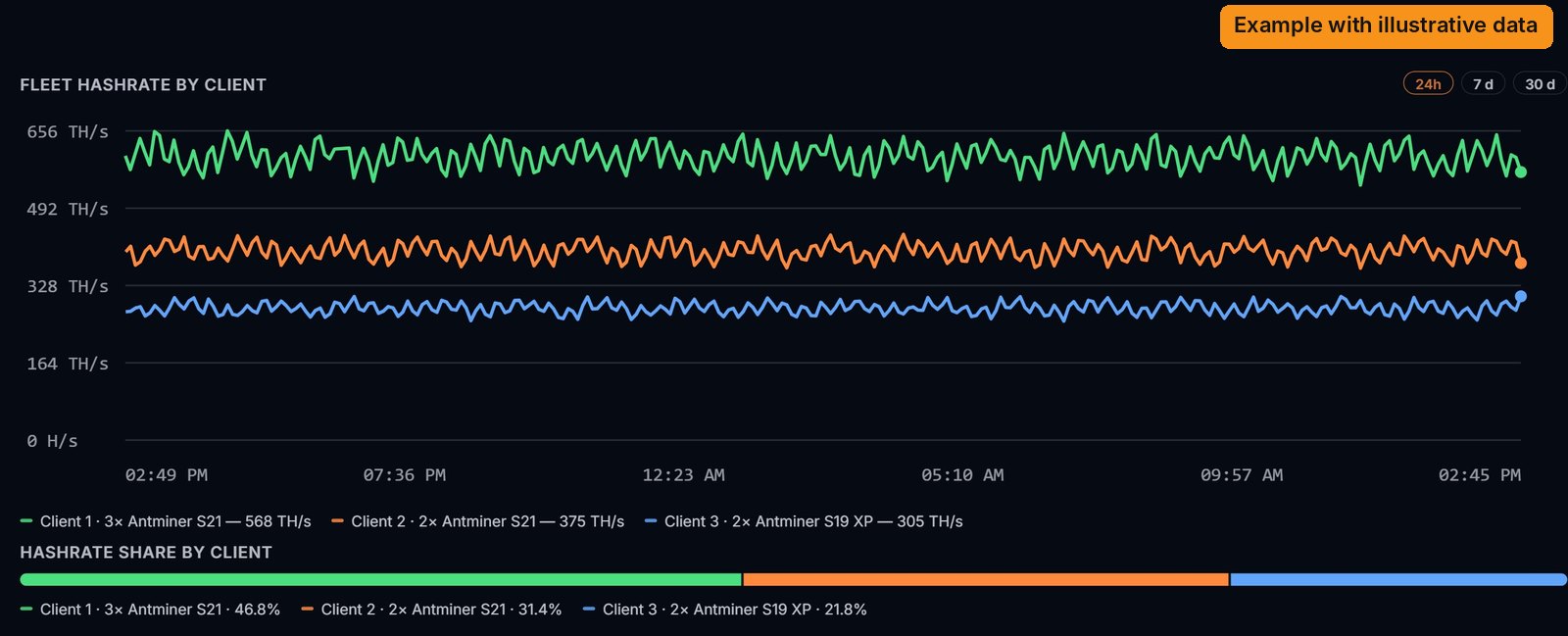
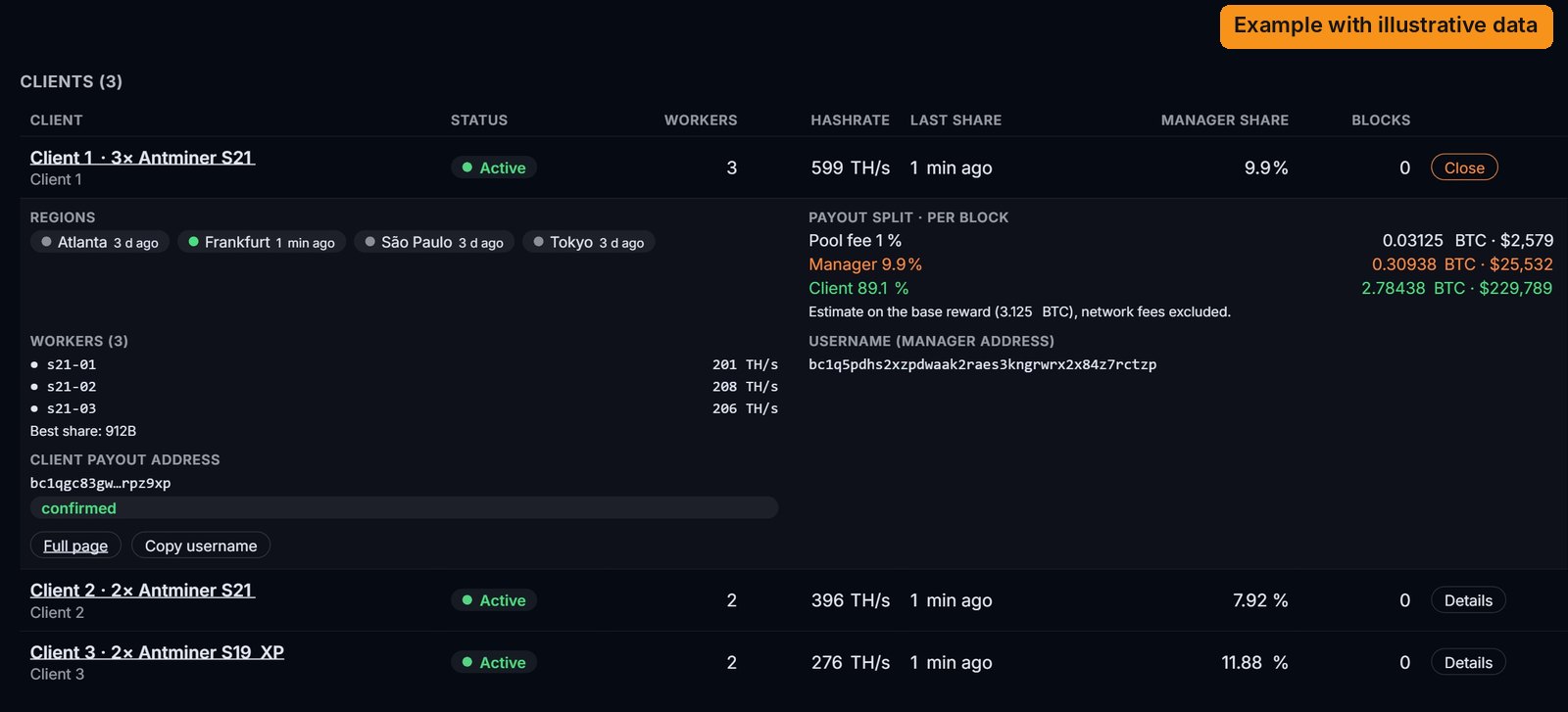
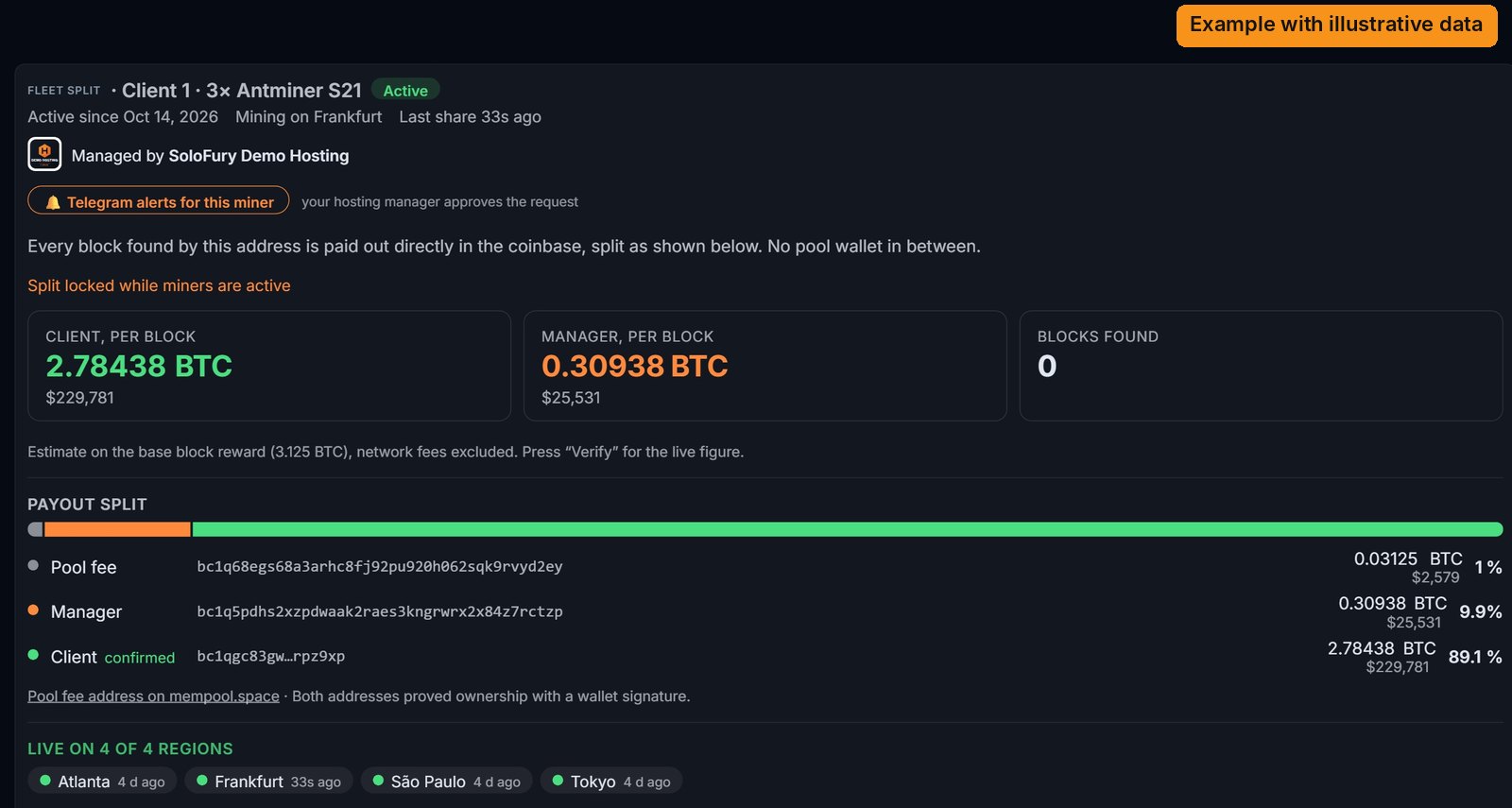
It refreshes every 30 seconds. The images show the real pages of the site. Client names, machines and fleet figures are an example with illustrative data (orange “Example with illustrative data” label): a fleet of 3 clients with 5 Antminer S21 and 2 Antminer S19 XP. The coinbase check and the Telegram screenshots are real.
Header and tiles. Your logo and name, the buttons to connect Telegram, then 8 tiles: fleet hashrate, workers online, active clients, blocks, expected time per block, your share of the next block, total paid to you, last share.
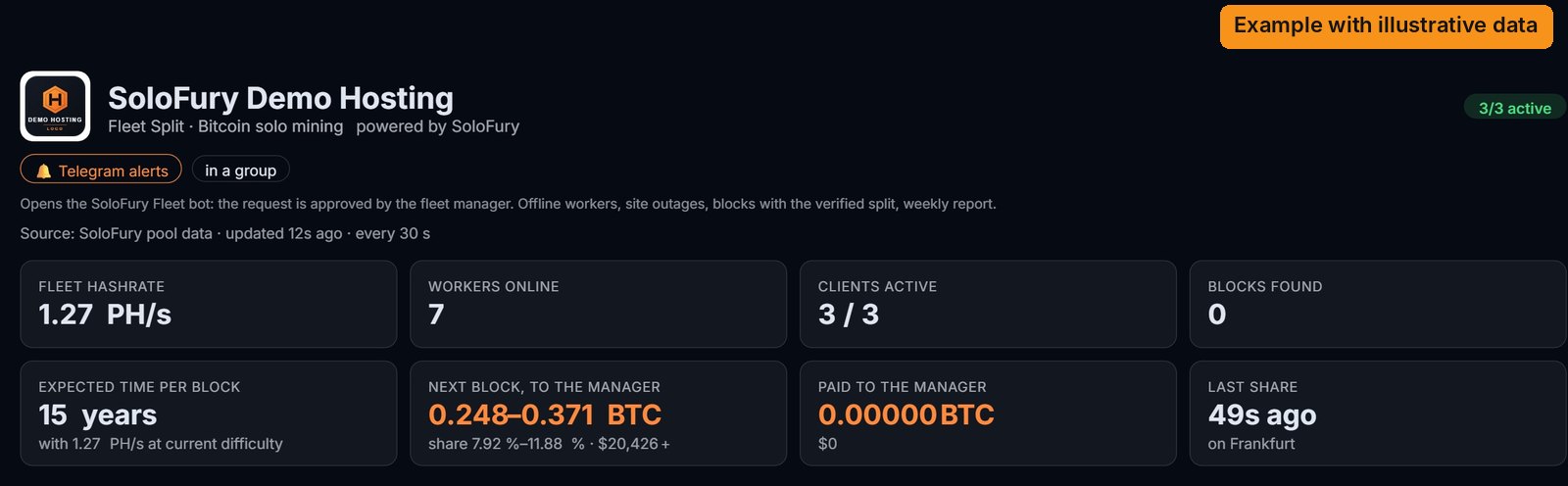
Chart. The hashrate of each client over the last 24 hours, 7 days or 30 days, and below it the hashrate share by client.
Clients. One row per client with status, workers, hashrate, last share, quota and blocks. Details opens the row: regions with their last share, the block split in BTC and USD, machines (stopped ones in orange), best share, addresses, Full page (the client’s page) and Copy username.
Blocks. The fleet’s blocks with the three quotas, and Export CSV.
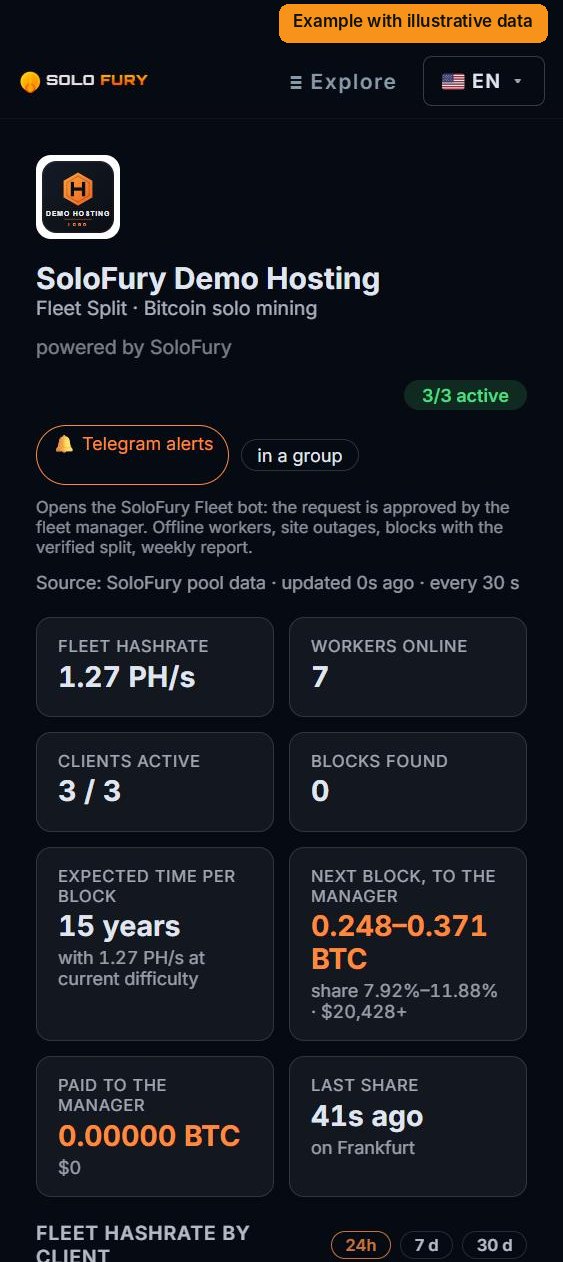
On a phone the page reads as cards, with the same data.
3.2 The client page
It is the SoloFury Miner page with the Fleet panel added. You send the client the link from “Full page” on your page.
At the top: status, active since, which region it is mining on, “Managed by” with your logo, the Telegram alerts button, how much goes to the client and to you for each block, the split line by line with addresses, and the regions where the agreement is live.
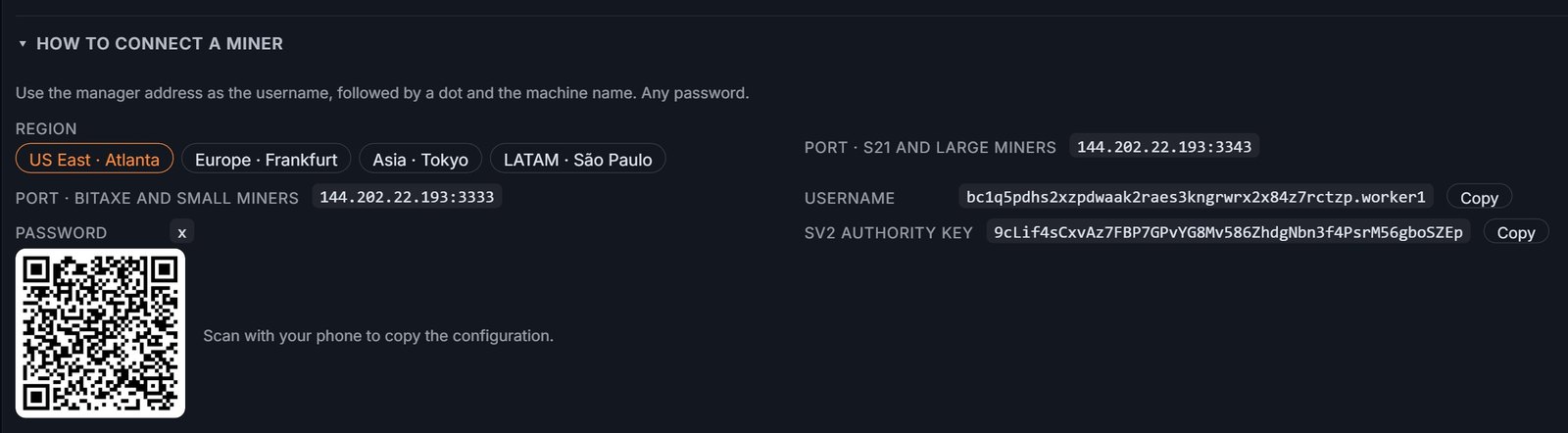
How to connect a miner: pick the region and the panel shows ports, username with Copy, the Stratum V2 key and a QR code to scan with a phone.
Verify the payout now: the button reads the real template of the next block from the pool server and shows the three outputs in satoshis, with block height and time. If they match the agreement, a green check appears.

Further down: the agreement’s blocks with amounts and status, and Export CSV.
3.3 Telegram — @SoloFuryFleetBot
Connecting.
- You: with the link or QR code you receive at activation, or from the “Telegram alerts” button on your page. Also in a group with your technicians.
- Your client, in one of three ways: they tap “Telegram alerts” on their page and you approve with one tap; or you send them the QR code created with “Invite client” (valid 7 days, one use); or they add the bot to one of their groups and send the request.
Menus. The buttons sit below the text field, like in the public SoloFury bot: Status, Clients, Alerts, Maintenance, Reports, Quiet, Invite client, Linked chats, Settings, Help. The bot starts in English; in Settings you choose one of 10 languages and the time zone (automatic, with daylight saving, or manual). Clients only see the buttons that concern them.
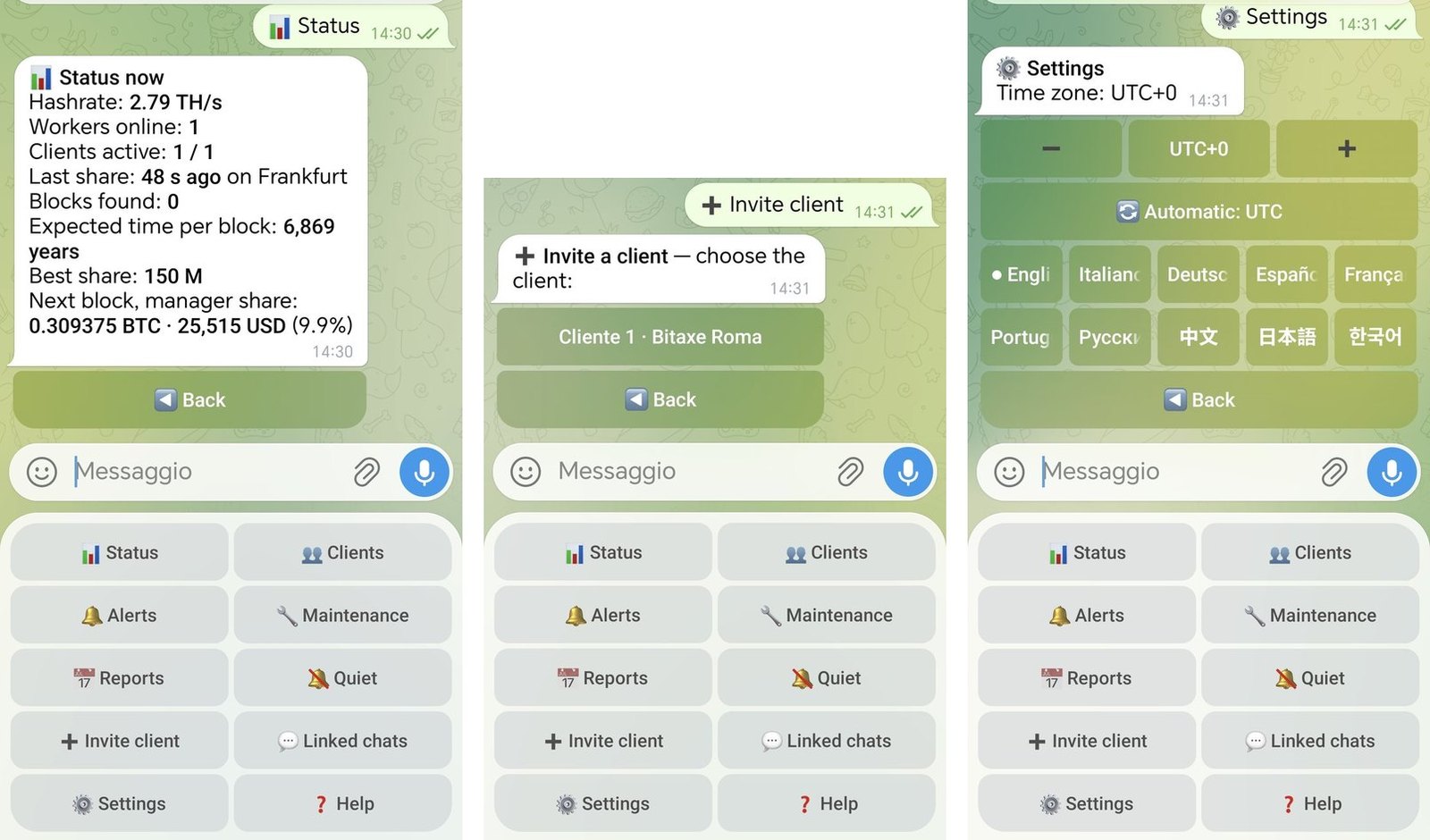
What you receive.
| Alert | When |
|---|---|
| Machine offline / back online | no shares for 10 minutes (adjustable threshold) |
| Client fully stopped | all of a client’s machines are down |
| Site outage | many machines drop together: a single message |
| Hashrate drop | last hour below 70% of the daily average, with the worst machines |
| Rejected shares | above 5% |
| Block found | immediately, with the split in BTC/USD and the Block Info proof; then “mature” or “orphaned” |
| Weekly report | Monday morning: uptime % per client, average hashrate, downtime, blocks, CSV attached |
Clients receive the same alerts, only for their own machines, plus best share records.
Against noise: Maintenance (no alerts, and the time is excluded from uptime in reports), night-time Quiet hours (alerts arrive together afterwards; blocks always immediately), at most 6 messages per hour, and Recent alerts to see what was sent or held back.
3.4 When a block arrives
- Within seconds: a Telegram alert to you and the client, with the amounts and a link to the Block Info page.
- About 17 hours later (100 confirmations): status mature, the bitcoin is spendable in your wallets.
- Rarely: if the network picks another chain, the block is orphaned and pays nobody. Pages and bot say so.
3.5 Good practice
- A new address for every client, never reused.
- Labels with name and machines: you will find them in the bot and in the CSV files.
- Declare maintenance before switching machines off.
- The first time, open the client page together with them and press “Verify the payout now”: it is the most convincing proof.
Part 4 — For the client
4.1 What you need
- A
bc1q…orbc1p…address from a wallet that signs messages (Sparrow, Ledger, Electrum, Trezor). No exchange addresses. - One signature, once, to prove the address is yours. No account.
4.2 What you get
- Your part of every block you find, directly in your wallet, in the block’s own transaction.
- Your page with hashrate, machines, best share, block split and the next-coinbase check.
- Telegram alerts on your machines and your blocks.
4.3 What you do
- Send your manager your address and signature.
- Set up your solo share with the details in the panel (option A or B, section 2.5).
- Tap “Telegram alerts” on your page: your manager approves.
Part 5 — Reference
Agreement rules
- Quotas: apart from the SoloFury 1%, fully configurable, with 0.01% precision. The only technical constraint: manager and client each receive at least 1% of the part after the pool fee. The agreed quota is fixed when the agreement is created. To change it: switch the share off; after 7 days without shares the agreement is closed and a new one is opened.
- True solo mining: a block pays only the client who found it (and you). Other clients receive nothing from that block.
- 100-confirmation maturity, like every coinbase. Orphaned blocks do not pay.
- Accepted addresses: native SegWit and Taproot (
bc1q…,bc1p…).
Ports: 3343 for large machines, 3333 for small machines, Stratum V1 and V2 on the same port.
Expected time per block: network difficulty × 2³² ÷ hashrate.
What is coming
- Manager console with signature login: create agreements and clients yourself.
- Automatic addresses per client from your xpub: a new client in one click.
- Private links for client pages.
- Read-only API, webhooks, email for Foreman, spreadsheets and management software.
- Fleet Pool for 50 PH/s datacenters: the fleet’s clients share every block the fleet finds in proportion to their work, with the SoloFury 1% and the manager’s quota, on a dedicated server in your region.
- Bitcoin Cash on request.
Contact
- Email: [email protected] — to activate your fleet, add clients and for any question. This is the main channel.
- Telegram: @Akira1980, for a quick question.
- X: @SoloFuryPool, news and blocks found.
- Demo: solofury.com/fleet/demo/ · Bot: @SoloFuryFleetBot · Overview for hosting providers: SoloFury Fleet for hosting
Frequently Asked Questions
Can the SoloFury 1% fee be negotiated?
No. It is the same fixed 1% for everyone and it funds the servers in the four regions. Your quota comes out of the client's part, never out of the pool fee.
Who decides the manager and client quotas?
You and your client, with your own agreement. Apart from the 1% SoloFury fee, quotas are fully configurable and can differ from client to client. SoloFury applies the quota you communicate when the agreement is created and writes it into the coinbase.
Do my clients have to leave their current pool?
No. They keep most of their hashrate in their FPPS or PPLNS pool and send only the share they choose to solo mining on SoloFury Fleet: whole machines, or a percentage of every machine with Braiins OS pool groups.
What does the solo share cost the client?
Over the long run the expected value of solo mining is close to that of a pool, minus the difference in fees and the quota agreed with the manager. What the client really gives up is regularity on that share of hashrate, in exchange for a real chance at a whole block.
Does SoloFury hold any funds?
No. The three outputs are written into the coinbase transaction built by the pool, so the bitcoin is created directly in the wallets of SoloFury, the manager and the client. There is no pool wallet in between.
Does the client need an account?
No. The client needs a bc1q or bc1p address from a wallet that can sign messages, and signs one message once to prove ownership. No registration, no password.
What happens if the server my machines are connected to goes down?
Machines switch to pool 2 or 3 in their configuration. The agreement is replicated on all four SoloFury servers, so the split is kept during failover.
Does SoloFury Fleet work with Braiins OS and Stratum V2?
Yes. Stratum V1 and V2 run on the same port, and the pool public key for V2 is shown in the client panel. With Braiins OS pool groups you can also send a fixed percentage of every machine's hashrate to SoloFury Fleet.